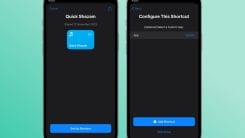
To fire up the voice assistant on your iPhone, you can say "Hey Siri" or simply "Siri," followed by your command. This has been true for a long time now, but Apple will finally let you change this to a custom trigger phrase of your choice "to launch shortcuts and complete complex tasks." This is not a blanket system-wide change coming with iOS 18, but it will allow you to set up custom phrases for some tasks in your workflow.
This means that although you won't be able to replace the "Hey Siri" command totally in iOS 18, you'll have the choice to make Siri do some things without calling it by its name.
iOS 18's big push for accessibility
We've written about iOS 18's accessibility features that Apple recently announced ahead of WWDC 2024, and one of these features is called Vocal Shortcuts. This will allow you to use custom phrases to trigger Siri. You'll also be able to launch shortcuts using custom phrases with iOS 18. The example Apple shared shows an iPhone using the phrase "Rings" to display your Activity Rings from the Apple Watch.

This is an accessibility feature designed to help people who face challenges with speech. It is a good example of why companies should invest more in improving accessibility—these features make the iPhone experience better for everyone. Vocal Shortcuts sounds like a great addition to the iPhone, but there are a few concerns that remain to be addressed.
Even the "Hey Siri" command gets triggered accidentally or sometimes isn't understood by the iPhone. It remains to be seen, then, how well Vocal Shortcuts work. There's always the chance that it ends up getting triggered by mistake, which could make the feature less useful. The screenshots shared by Apple show that it works just like Siri's setup process, where your iPhone will ask you to say the phrase a few times to learn how you say it. The Vocal Shortcut will be based on your speech, which should reduce the chances of firing up your shortcuts accidentally.